

Technology has become an integral part of today’s healthcare industry, not only helping doctors and practice leaders enhance the quality of patient care but also in optimizing administrative processes and strengthening the productivity of their organization. One groundbreaking advancement in the last few decades is the adoption of Electronic Health Record (EHR) systems in healthcare management, which, according to the National Electronic Health Records Survey (NEHRS) published in 2025 by the U.S. Centers for Disease Control and Prevention (CDC), are being used by 95.0% of U.S. doctors.
As EHRs become an essential part of clinical work, you must make sure that your choice of system aligns with your patients’ demographics and your practice’s needs. Apart from basic functionality, understanding your practice’s EHR requirements can help you identify the features that will have the greatest impact on your practice’s long-term success. Here are the different EHR features you must look for when choosing or switching to a new system.
1. Interoperability & Integration Capabilities
When choosing an EHR software, you should prioritize seamless integration with other systems and platforms. With how interconnected the healthcare landscape is, you’re bound to need a secure way to transmit patient information among other providers. An EHR system that supports Health Information Exchange (HIE) standards will let you share data efficiently, reducing redundancies and promoting a collaborative approach to patient care. Moreover, integrating with lab systems, billing software, and other third-party applications will help you streamline your practice’s workflow, boosting its efficiency and minimizing errors.
2. Appointment Scheduling & Waitlist Management
A positive patient experience starts before your patients walk in the door, which is why appointment scheduling and waitlist management are EHR capabilities your system of choice must have. By providing an online appointment booking option for patients, you can reduce the volume of phone calls your team must attend to, lessening their workload and increasing their capacity for other, more pressing tasks. In addition, a waitlist management feature will let you handle cancellations efficiently, letting you optimize your schedule to see more patients instead of bearing the cost of patient no-shows.
3. Customization & Workflow Adaptability
Healthcare practices rarely operate the same way, making flexibility one of the most important EHR software features you should consider. From patient intake and documentation to care coordination and follow-up processes, every practice has its own workflows, team structure, and operational requirements, and an EHR system that will let you customize templates, forms, workflows, and data fields can better support the way your practice operates. When your system reflects your processes instead of forcing you to adapt to rigid workflows, your team can work more efficiently, reduce onboarding challenges, and deliver a more consistent patient experience.
4. Comprehensive Clinical Documentation
An accurate and comprehensive clinical documentation process is the backbone to how you deliver quality patient care. For this reason, your EHR system should let you facilitate thorough yet standardized documentation of patient encounters, diagnoses, treatment plans, and follow-up instructions. Features like structured templates, voice transcription, and smart algorithms for auto-populating common data will make documentation faster without compromising the accuracy of information. Furthermore, a robust EHR system will help you effectively maintain patient documents, making it easy to track changes in patient health even if they have an extensive list of clinical records.
5. Interdisciplinary Collaboration Tools
A patient’s treatment journey often involves multiple providers, nurses, specialists, therapists, as well as in-person staff and healthcare virtual assistants working across different areas of care. Keeping everyone aligned can be challenging without the right systems in place. EHR software with care coordination, shared documentation, and collaboration tools helps ensure information is accessible to the right people at the right time, supporting a more connected care experience and reducing the risk of gaps in treatment.
6. Telehealth & Patient Engagement
As healthcare continues to embrace virtual care, telehealth has become an important way doctors reach more patients while improving access to care. Whether serving patients in rural communities, accommodating busy schedules, or reducing unnecessary office visits, virtual encounters have become an extension of modern healthcare delivery. Because of this shift, your EHR software features should include telehealth capabilities and patient engagement tools such as appointment reminders and patient portals. Together, these features can make healthcare more accessible while keeping patients involved in their treatment and their information protected.
7. Data Security & Privacy Measures
With healthcare becoming more digital, the industry has also become a major target for cyberattacks, data breaches, and unauthorized access to patient information. Apart from the financial consequences, which can reach up to $2.1 million annually, security violations and HIPAA breaches can easily erode patient trust and harm a practice’s reputation. For this reason, your EHR system should include robust security features such as data encryption, access controls, audit trails, and secure data storage.
8. Disaster Recovery & Data Backup
Protecting patient information, however, isn’t just about preventing cyberattacks and unauthorized access. You should also be prepared for unexpected events such as system failures, hardware malfunctions, or other technological disruptions that can prevent you from accessing important patient records. An EHR system should include reliable data backup and disaster recovery capabilities that let you restore patient information quickly and accurately when issues arise. Having these levels of protection will help you continue seeing and treating patients during unforeseen technological scenarios.
9. Vendor Support & Training
A powerful tool is only as effective as the people using it. Because the features of EHR systems often include a wide range of features, you and your team members will need time and guidance to learn how to use them effectively, making vendor support an important consideration. Apart from providing onboarding and training, your ideal EHR vendor should also offer technical support, immediate troubleshooting assistance, and guidance during software updates or system enhancements. Having access to reliable support can help minimize disruptions and ensure your practice gets the most value from its EHR.
10. Scalability & Future Readiness
With new technologies, approaches, and patient expectations continuing to shape the healthcare industry, doctors and practice leaders must always stay adaptable. While it’s important that your EHR can support your practice’s current needs, it should also be flexible enough to help you accommodate future changes that improve the way patients receive care. Regular software updates that introduce new features, improve usability, and address emerging industry needs can help you stay on top of all of them. When you choose a scalable and future-ready system, you can adapt to industry changes as they come without disrupting your operations or patient experience.
How To Choose the Right EHR
When choosing your practice’s EHR software, you need to understand how critical this decision is because it is rarely about the basic functionalities. Rather, it’s more about how it can help your practice navigate changes in patient expectations, care delivery models, and industry regulations.
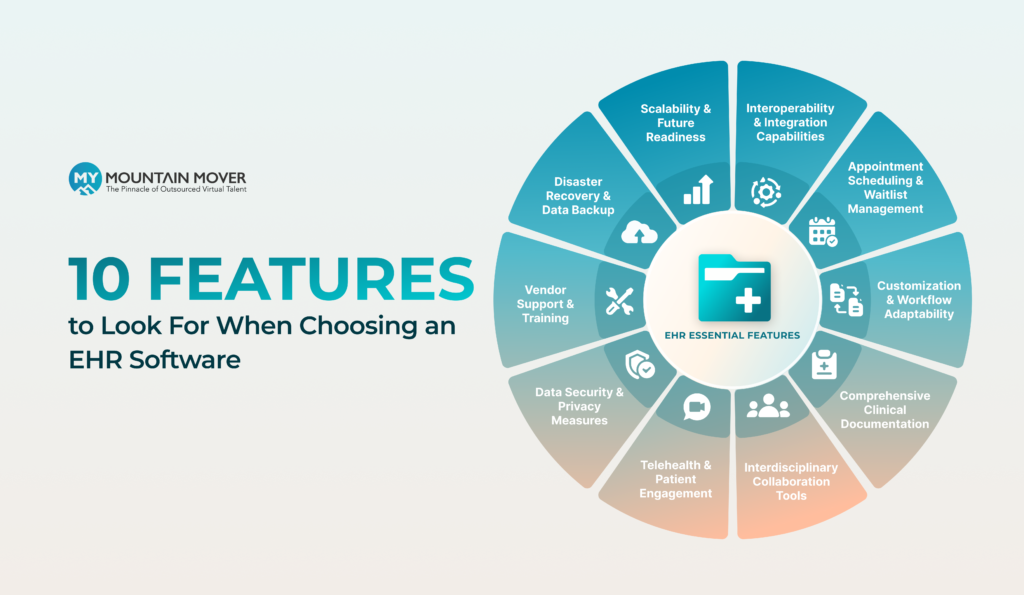
Take into account these 10 features and prioritize the ones that will not only support your practice’s workflow but will also help you achieve its long-term goals. By doing so, you’ll make your EHR system less of an expense and more an investment.
Frequently Asked Questions
Is it HIPAA-compliant to give EHR access to a medical virtual assistant?
Yes, as long as proper safeguards are in place. Medical VAs can access EHR systems securely when they use HIPAA-compliant access methods and are only granted access to the information necessary to fulfill their tasks.
Should I switch EHR systems or optimize the one I already have?
If your current system can support your workflows and third-party tools, you might be better off optimizing than switching. But if its functionality is limiting your practice’s capabilities, you might want to consider switching to a different EHR software.
How difficult is it to switch to a new EHR system?
This will depend on your prospect vendor, but it will always require planning and training. Many EHR vendors provide implementation support, data migration, and resources so that you can transition seamlessly.